
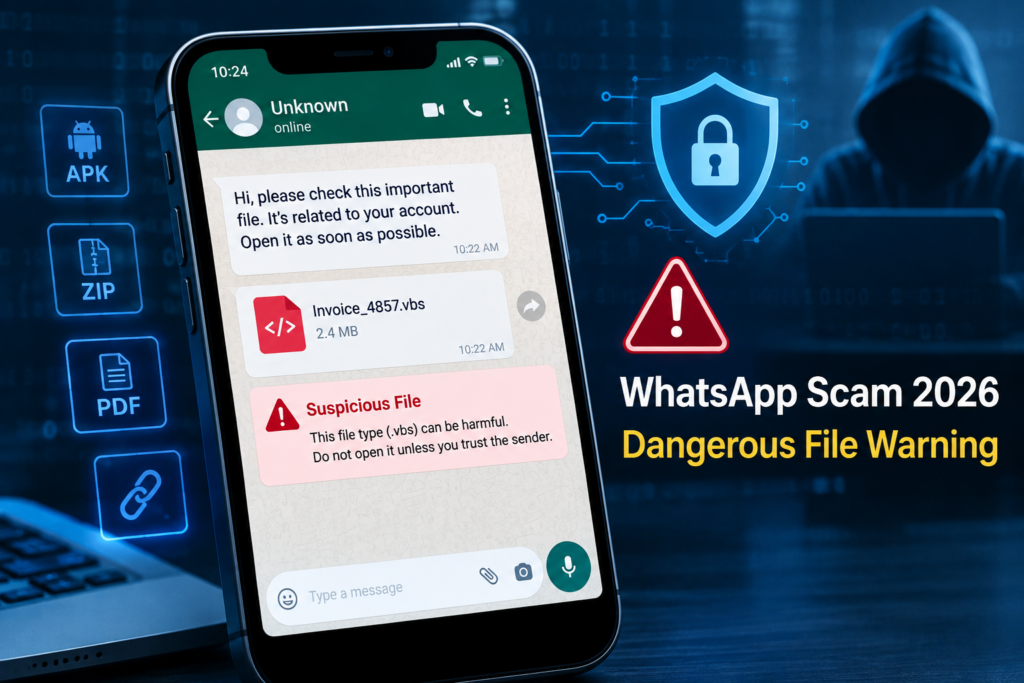
WhatsApp is one of the most widely used messaging apps for personal and business communication. People use it to send photos, videos, PDFs, documents, invoices, APK files, and website links every day.
But this convenience also creates opportunities for scammers and cybercriminals.
In 2026, users should be especially careful with unexpected WhatsApp files and attachments. CERT-In reported a malware campaign in June 2026 targeting WhatsApp Desktop and WhatsApp Web users through malicious Visual Basic Script (VBScript) attachments. Attackers were also using compromised WhatsApp accounts, which can make a suspicious file appear to come from someone the victim already knows.
This guide explains how to recognize a WhatsApp Scam 2026, which files can be risky, how these scams work, and what you should do if you receive a suspicious attachment.
What Is a WhatsApp Scam in 2026?
A WhatsApp scam is an attempt to trick a user into giving away money, personal information, account access, or device access through WhatsApp.
The scam may involve:
- A suspicious file
- A malicious APK
- A fake invoice
- A fake payment receipt
- A phishing link
- A fake job offer
- A fake government notice
- A fake delivery message
- A request for an OTP or verification code
- A QR code or device-linking request
Not every suspicious WhatsApp message contains malware. Some scams are designed simply to convince you to transfer money or reveal sensitive information.
WhatsApp itself recommends carefully checking suspicious messages, links, and files before interacting with them.
What Has Changed in 2026?
The threat is not simply about messages from unknown numbers.
One important development highlighted by CERT-In in 2026 is the use of compromised WhatsApp accounts to distribute malicious attachments.
In the June 25, 2026, advisory, CERT-In reported a campaign involving malicious VBScript files sent through WhatsApp messages. Because attackers could use compromised accounts, the message might appear to come from a friend, colleague, or business contact.
That creates an important security lesson:
A file can be dangerous even when it comes from someone you know.
Meta has also introduced new anti-scam protections. In March 2026, Meta announced WhatsApp warnings for potentially suspicious device-linking requests. These warnings are intended to help users identify attempts to connect a scammer’s device to their WhatsApp account.
CERT-In also disclosed WhatsApp vulnerabilities in May 2026 and advised users to update WhatsApp to the latest available version.
Therefore, keeping WhatsApp and your operating system updated remains an important part of basic protection.
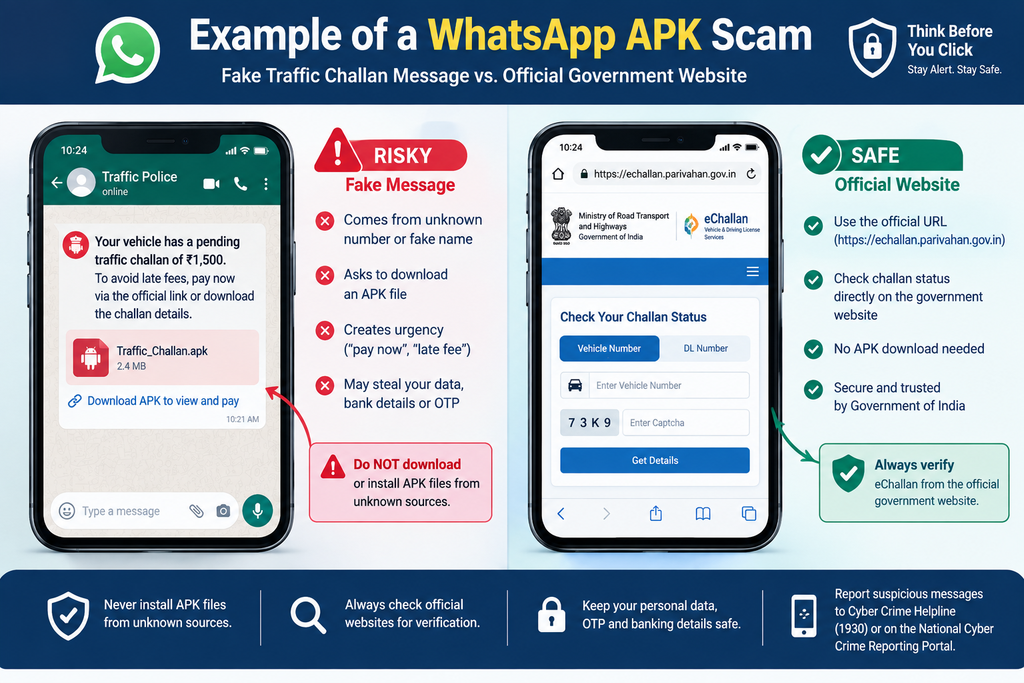
How Does a Dangerous WhatsApp File Scam Work?
A typical attack can happen in several stages.
You receive a message.
The message may say:
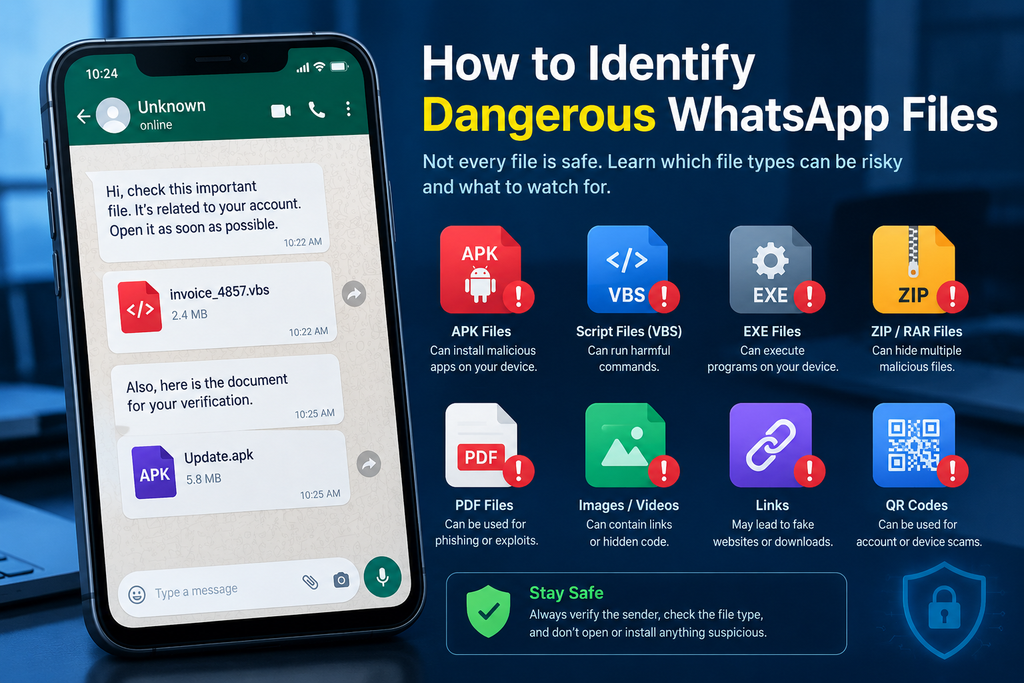
- “Open this invoice.”
- “Your payment receipt is attached.”
- “Check this important document.”
- “Your delivery failed.”
- “Download your challan.”
- “See this private photo.”
- “Open this job offer.”
- “Install this application.”
The message may create urgency so that you act without thinking.
A file is attached.
The attacker may send a document, script, archive, APK, or another file.
Some files may look harmless because the filename or message makes them appear to be legitimate business or personal documents.
CERT-In specifically warned about malicious VBScript attachments being distributed through WhatsApp in 2026.
The victim opens or installs it.
The risk becomes greater when the user opens an unexpected executable or installs an application from an untrusted source.
Android users should be particularly careful with APK files received through WhatsApp.
CERT-In has separately warned about Android malware campaigns using fake RTO and e-Challan messages to persuade users to install malicious APK files.
The attacker may attempt to steal information.
Depending on the malware or scam, attackers may attempt to obtain credentials, personal information, or other sensitive data.
CERT-In reported that the 2026 WhatsApp attachment campaign could result in unauthorized remote access, credential theft, additional malware deployment, data exfiltration, and business disruption.
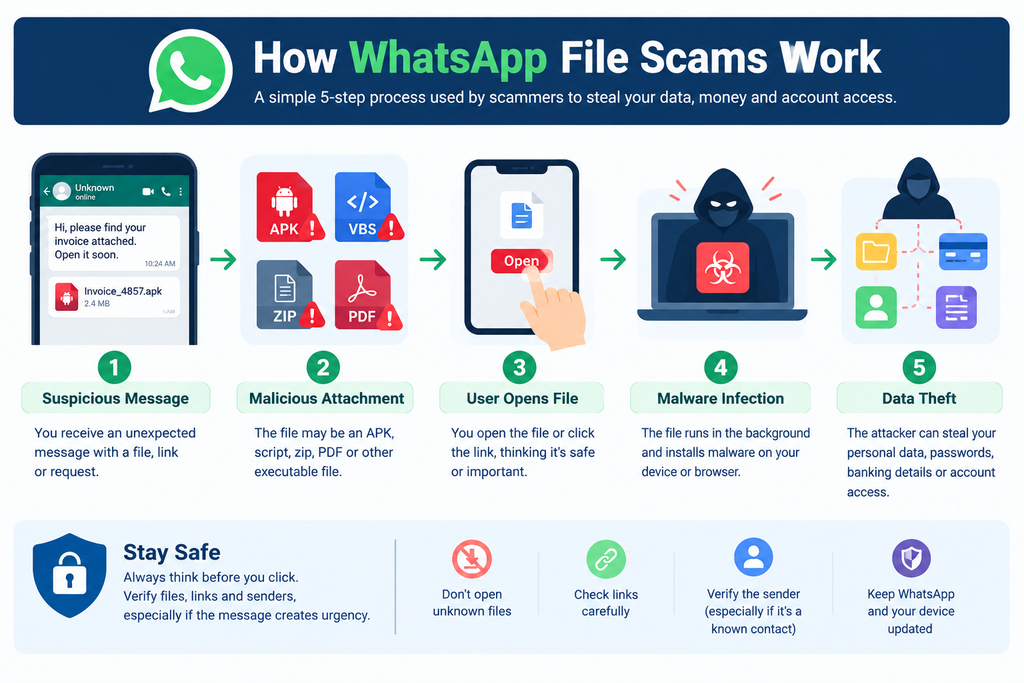
Which WhatsApp Files Should You Be Careful With?
There is no single file extension that automatically means “scam.” However, unexpected executable or installable files deserve particular caution.
WhatsApp Scam 2026: How to Identify Dangerous Files
WhatsApp Scam 2026: How to Identify Dangerous Files
WhatsApp is one of the most widely used messaging apps for personal and business communication. People use it to send photos, videos, PDFs, documents, invoices, APK files, and website links every day.
But this convenience also creates opportunities for scammers and cybercriminals.
In 2026, users should be especially careful with unexpected WhatsApp files and attachments. CERT-In reported a malware campaign in June 2026 targeting WhatsApp Desktop and WhatsApp Web users through malicious Visual Basic Script (VBScript) attachments. Attackers were also using compromised WhatsApp accounts, which can make a suspicious file appear to come from someone the victim already knows.
This guide explains how to recognize a WhatsApp Scam 2026, which files can be risky, how these scams work, and what you should do if you receive a suspicious attachment.
What Is a WhatsApp Scam in 2026?
A WhatsApp scam is an attempt to trick a user into giving away money, personal information, account access, or device access through WhatsApp.
The scam may involve:
- A suspicious file
- A malicious APK
- A fake invoice
- A fake payment receipt
- A phishing link
- A fake job offer
- A fake government notice
- A fake delivery message
- A request for an OTP or verification code
- A QR code or device-linking request
Not every suspicious WhatsApp message contains malware. Some scams are designed simply to convince you to transfer money or reveal sensitive information.
WhatsApp itself recommends carefully checking suspicious messages, links, and files before interacting with them.
What Has Changed in 2026?
The threat is not simply about messages from unknown numbers.
One important development highlighted by CERT-In in 2026 is the use of compromised WhatsApp accounts to distribute malicious attachments.
In the June 25, 2026, advisory, CERT-In reported a campaign involving malicious VBScript files sent through WhatsApp messages. Because attackers could use compromised accounts, the message might appear to come from a friend, colleague, or business contact.
That creates an important security lesson:
A file can be dangerous even when it comes from someone you know.
Meta has also introduced new anti-scam protections. In March 2026, Meta announced WhatsApp warnings for potentially suspicious device-linking requests. These warnings are intended to help users identify attempts to connect a scammer’s device to their WhatsApp account.
CERT-In also disclosed WhatsApp vulnerabilities in May 2026 and advised users to update WhatsApp to the latest available version.
Therefore, keeping WhatsApp and your operating system updated remains an important part of basic protection.
How Does a Dangerous WhatsApp File Scam Work?
A typical attack can happen in several stages.
1. You receive a message.
The message may say:
- “Open this invoice.”
- “Your payment receipt is attached.”
- “Check this important document.”
- “Your delivery failed.”
- “Download your challan.”
- “See this private photo.”
- “Open this job offer.”
- “Install this application.”
The message may create urgency so that you act without thinking.
2. A file is attached.
The attacker may send a document, script, archive, APK, or another file.
Some files may look harmless because the filename or message makes them appear to be legitimate business or personal documents.
CERT-In specifically warned about malicious VBScript attachments being distributed through WhatsApp in 2026.
3. The victim opens or installs it.
The risk becomes greater when the user opens an unexpected executable or installs an application from an untrusted source.
Android users should be particularly careful with APK files received through WhatsApp.
CERT-In has separately warned about Android malware campaigns using fake RTO and e-Challan messages to persuade users to install malicious APK files.
4. The attacker may attempt to steal information.
Depending on the malware or scam, attackers may attempt to obtain credentials, personal information, or other sensitive data.
CERT-In reported that the 2026 WhatsApp attachment campaign could result in unauthorized remote access, credential theft, additional malware deployment, data exfiltration, and business disruption.
Which WhatsApp Files Should You Be Careful With?
There is no single file extension that automatically means “scam.” However, unexpected executable or installable files deserve particular caution.
| File or message type | Risk to watch for | What to do |
|---|---|---|
| APK | Can install an Android application | Don’t install from an unknown source. |
| VBS/script | Can execute commands on a computer | Don’t open unexpected scripts. |
| EXE/program | Can run software on Windows | Avoid unexpected files. |
| ZIP/RAR | Can contain dangerous files | Don’t extract unknown archives. |
| PDF/document | Can be used for phishing or exploit delivery | Verify sender and context. |
| Image/video | Can be used to lure you to links or downloads | Don’t assume every media file is safe. |
| Link | May lead to a fake website | Check the destination carefully |
| QR code | May be used for account/device scams | Don’t scan unexpected codes. |
The important point is context. A familiar-looking filename does not prove that a file is safe.
7 Warning Signs of a Dangerous WhatsApp File
1. You Were Not Expecting the File
If a friend suddenly sends you an invoice, ZIP file, APK, or business document without explanation, stop before opening it.
CERT-In recommends verifying unexpected attachments with the sender through another communication method.
2. The Message Creates Urgency
Be careful with messages saying:
- “Open immediately.”
- “Your account will be blocked.”
- “Last warning.”
- “Payment required today.”
- “Download within 10 minutes.”
Urgency can be used to stop people from checking whether the message is genuine.
3. The File Is an APK
An APK is an Android application package.
If someone sends you an APK through WhatsApp and tells you to install it, do not assume it is an official application.
CERT-In specifically advises users not to install APK files received through WhatsApp, SMS, Telegram, or random websites.
4. The Sender’s Behavior Looks Different
A trusted contact may suddenly send a strange message or attachment because their account could have been compromised.
Call the person using a phone number you already know rather than simply trusting the WhatsApp message.
5. The Link Looks Strange
WhatsApp warns users about suspicious links, including links containing unusual characters that can make a malicious website look similar to a legitimate one.
Always inspect the domain before opening an unfamiliar link.
6. You Are Asked to Install an App
A message claiming that you need a special application to see a document, photograph, delivery notification, or government notice should be treated carefully.
For official services, go directly to the official website or app rather than installing an application sent by a stranger.
7. Someone Requests a Verification Code
Never share your WhatsApp registration code or other sensitive verification information simply because someone asks for it.
Scammers can also attempt to trick users into linking their WhatsApp account to another device. Meta introduced warnings for potentially suspicious device-linking activity in 2026.
Real-Life Examples of WhatsApp File Scams
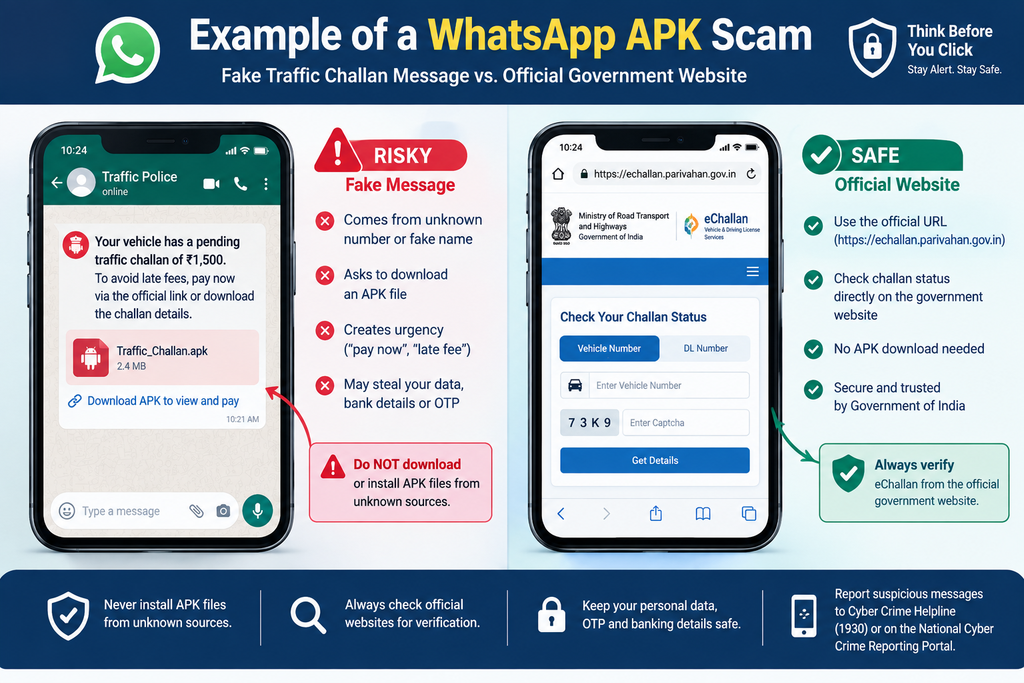
Example 1: Fake Government Challan APK
CERT-In reported an Android malware campaign in March 2026 involving fake RTO and e-Challan notifications.
The attacker could use messages containing links or APK files with names resembling official applications. The goal was to persuade users to install malicious software.
Safer approach: Check traffic challans through the official government portal rather than installing an APK received through WhatsApp.
Example 2: Malicious Business Document
In June 2026, CERT-In reported a WhatsApp malware campaign involving malicious VBScript attachments.
Attackers used compromised WhatsApp accounts to send files to contacts. The files could be disguised as routine business documents such as invoices or financial documents.
Safer approach: If a colleague suddenly sends an unusual invoice or document, confirm it with them separately before opening it.
Example 3: Fake Link From a Friend
A scammer may compromise an account and send a link to existing contacts.
Because the message appears to come from a familiar person, the recipient may trust it.
Safer approach: Call the person directly and ask whether they actually sent the link.
Are WhatsApp Files Always Dangerous?
No.
Receiving a file through WhatsApp does not automatically mean that the file contains malware.
The important issue is whether the file, sender, link, or request is trustworthy.
You should pay particular attention to:
- Unexpected attachments
- Executable files
- Scripts
- APK installations
- Unknown links
- Requests for account access
- Requests for money
- Urgent messages
- Messages that are unusual for the sender
WhatsApp itself recommends examining suspicious links and files before opening them.
Risks You Should Know About
A successful scam or malware infection can potentially expose users or businesses to several risks.
Personal Risks
- Loss of account access
- Theft of credentials
- Exposure of personal information
- Unauthorized access to a device
- Financial fraud
Business Risks
Businesses may face additional problems if an employee opens a malicious attachment on a company computer.
CERT-In says the 2026 WhatsApp attachment campaign could lead to unauthorized remote access, credential theft, data exfiltration, lateral movement, and business disruption.
This is why companies should treat unexpected WhatsApp attachments as a cybersecurity issue, not just a messaging problem.
What Should You Do If You Receive a Suspicious File?
Use this simple process:
Step 1: Don’t Open It
Do not open an unexpected file just to “see what it is.”
Step 2: Don’t Install It
If it is an APK or another application file, don’t install it simply because the message claims it is important.
Step 3: Verify the Sender
Call the sender or contact them through another trusted channel.
Step 4: Don’t Forward It
Forwarding a suspicious file can expose other people to the same threat.
Step 5: Delete and Block if Necessary
If the message is clearly malicious or fraudulent, delete it and block the sender.
Step 6: Report Suspicious Activity
Use WhatsApp’s reporting tools where appropriate.
Step 7: Keep Software Updated
Install updates for WhatsApp, Android, iOS, Windows, and other software when they become available.
CERT-In specifically advised affected WhatsApp users to update to the latest available versions following its 2026 vulnerability notice.
What If You Already Opened a Suspicious File?
Don’t panic, but act quickly.
If you installed a suspicious Android APK, CERT-In recommends disconnecting mobile data/Wi-Fi, uninstalling the suspicious application, running a trusted antivirus scan and checking accounts for unauthorized activity.
You should also consider:
- Changing important passwords from a trusted device
- Checking banking and payment accounts
- Checking WhatsApp-linked devices
- Updating your phone and applications
- Contacting your bank if you notice unauthorized transactions
- Reporting suspected cybercrime through India’s official cybercrime reporting system
If money has already been lost, contact your bank or payment provider immediately and report the incident through the appropriate official channel.
How Businesses Can Protect Employees
Businesses should create simple rules for WhatsApp communication.
For example:
- Employees should not install APK files received through WhatsApp.
- Unexpected invoices should be verified.
- Important payment instructions should be confirmed through an approved channel.
- Employees should keep company devices updated.
- Suspicious attachments should be reported to IT or security staff.
- Business WhatsApp accounts should be protected with appropriate account-security settings.
Training employees to pause, verify, and report can reduce the chance of a rushed mistake.
Frequently Asked Questions
1. What is a WhatsApp Scam 2026?
A WhatsApp Scam 2026 refers to scams and malicious activities targeting WhatsApp users during 2026. These can involve dangerous files, APKs, phishing links, fake messages, account takeover attempts, and fraudulent payment requests.
2. Can a WhatsApp file contain malware?
Yes. CERT-In reported a 2026 campaign in which malicious VBScript files were distributed through WhatsApp messages. The campaign targeted WhatsApp Desktop and WhatsApp Web users.
3. Is it safe to install an APK received on WhatsApp?
You should not install APK files received through WhatsApp from unknown or untrusted sources. CERT-In specifically advised users not to install APKs received through WhatsApp, SMS, Telegram, or random websites.
4. Can a file from a friend still be dangerous?
Yes. A friend’s WhatsApp account could potentially be compromised, allowing attackers to send messages or attachments to that person’s contacts. CERT-In highlighted this technique in its June 2026 advisory.
5. What should I do if I accidentally install a suspicious APK?
Disconnect the device from mobile data and Wi-Fi, uninstall the suspicious application, run a trusted security scan, and check important accounts for unauthorized activity. CERT-In also recommends changing passwords/UPI PINs where appropriate and checking bank statements if financial information may have been exposed.
6. How can I identify a suspicious WhatsApp link?
Look carefully at the website address, unusual characters, unexpected domains, and the context of the message. WhatsApp has a warning system for some suspicious links and recommends reviewing links carefully before opening them.
7. Does updating WhatsApp really matter?
Yes. Software updates can include security fixes. CERT-In issued a May 2026 vulnerability notice affecting certain WhatsApp versions and advised users to update to the latest available versions.
Conclusion
The biggest lesson from the WhatsApp Scam 2026 threat landscape is simple: don’t trust a file just because it arrives in a familiar chat.
A message can come from a friend, colleague, or business contact and still require verification. Current CERT-In advisories show that attackers are using compromised accounts and malicious attachments to make scams appear more believable.
For everyday users, the safest habit is to pause before opening unexpected files, avoid installing APKs from messages, check suspicious links, and verify unusual requests directly with the sender.
For businesses, employee awareness and basic device security are equally important.
WhatsApp and other technology platforms continue to add security features, but users still play an important role in preventing scams. When something feels unusual, stop, verify, and only then take action.
Pingback: Online Payment Scams 2026: 10 Scams to Avoid